Drawing Robot Software Control
Project Overview
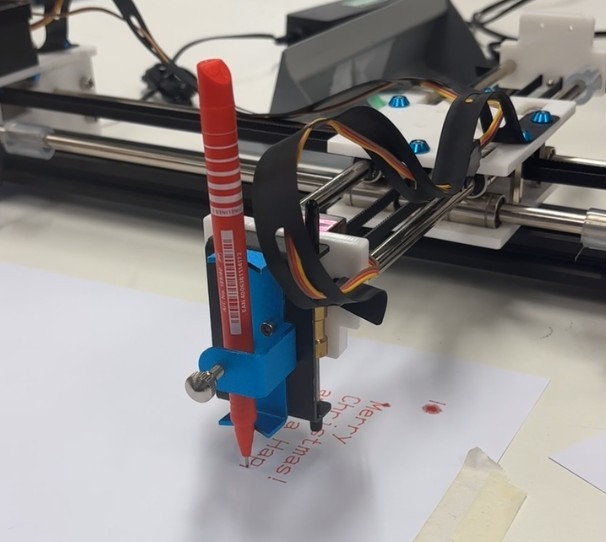
This project involved developing software in C to control a Cartesian drawing robot using Arduino. The program reads text input and generates G-code commands to control the robot's three-axis motion, enabling it to draw text characters. The software was developed using VS Code and Arduino IDE, with testing performed using a web-based G-code simulator before deployment to the physical robot.
Technical Requirements
The software needed to read text from input files, convert characters to coordinate sequences, generate properly formatted G-code commands for three-axis motion, and communicate with the Arduino-controlled robot via serial interface. The code required proper structure with well-named variables, error trapping, and clear documentation for team development.
Implementation
The software was developed with a modular architecture separating text processing, G-code generation, and serial communication functions. The program structure included custom header files (.h) and implementation files (.c) for different functional components, ensuring maintainability and clear code organization.
Key Components
- Text Parser: Reads input text files and processes characters for conversion to drawing commands
- G-code Generator: Converts character definitions to properly formatted G-code movement commands (G00, G01, etc.)
- Serial Communication: Manages communication with Arduino via RS232, including command transmission and response handling
- Configuration System: Preprocessor directives (#define) enabling switching between simulator mode and robot testing mode
Development Process
Development followed a structured planning and implementation approach with comprehensive documentation. The project utilized Git version control for regular commits throughout development, ensuring proper tracking of code evolution and changes from initial planning to final implementation.
Testing Strategy
- Code tested with simulator (
https://nraynaud.github.io/webgcode/) by printing G-codes to terminal - Validated with different text inputs and font sizes to ensure robustness
- Used preprocessor directives to switch between simulator and robot modes without code changes
- Final validation performed on physical robot hardware
Documentation Deliverables
A comprehensive system manual was developed to enable future team development and maintenance. The documentation included detailed descriptions of all custom functions with prototypes, parameter definitions, and return values. Flowcharts illustrated program structure and function call sequences, while test data validated conformance to specifications.
Skills Developed
- C programming for embedded systems and Arduino
- G-code generation and CNC machine communication protocols
- Modular software design with separate .c and .h files
- Serial communication and RS232 interfacing
- Preprocessor directives for conditional compilation
- Version control using Git for software development
- Technical documentation and system manual creation
- Software testing and validation methodologies
- Debugging tools and simulation-based verification
Reflection
This project provided valuable experience in developing embedded software following professional engineering practices. The challenge of translating text to robot motion required careful consideration of coordinate systems and movement sequences. Using version control throughout development reinforced good software engineering habits, while the comprehensive documentation requirements highlighted the importance of clear technical communication for team-based projects.
The most valuable aspect was learning to design software that could be easily tested and validated before deployment to hardware. The preprocessor directive approach allowing seamless switching between simulator and robot modes demonstrated the power of conditional compilation for embedded development. The experience of documenting functions, data structures, and testing strategies proved essential for creating maintainable, professional-quality code.